Quiet Mind Creative
What Brave Shields Showed Us About Our Own Analytics
Brave blocked over a hundred tracking requests on a site where we had installed exactly two analytics tools. Figuring out why changed how we choose analytics.
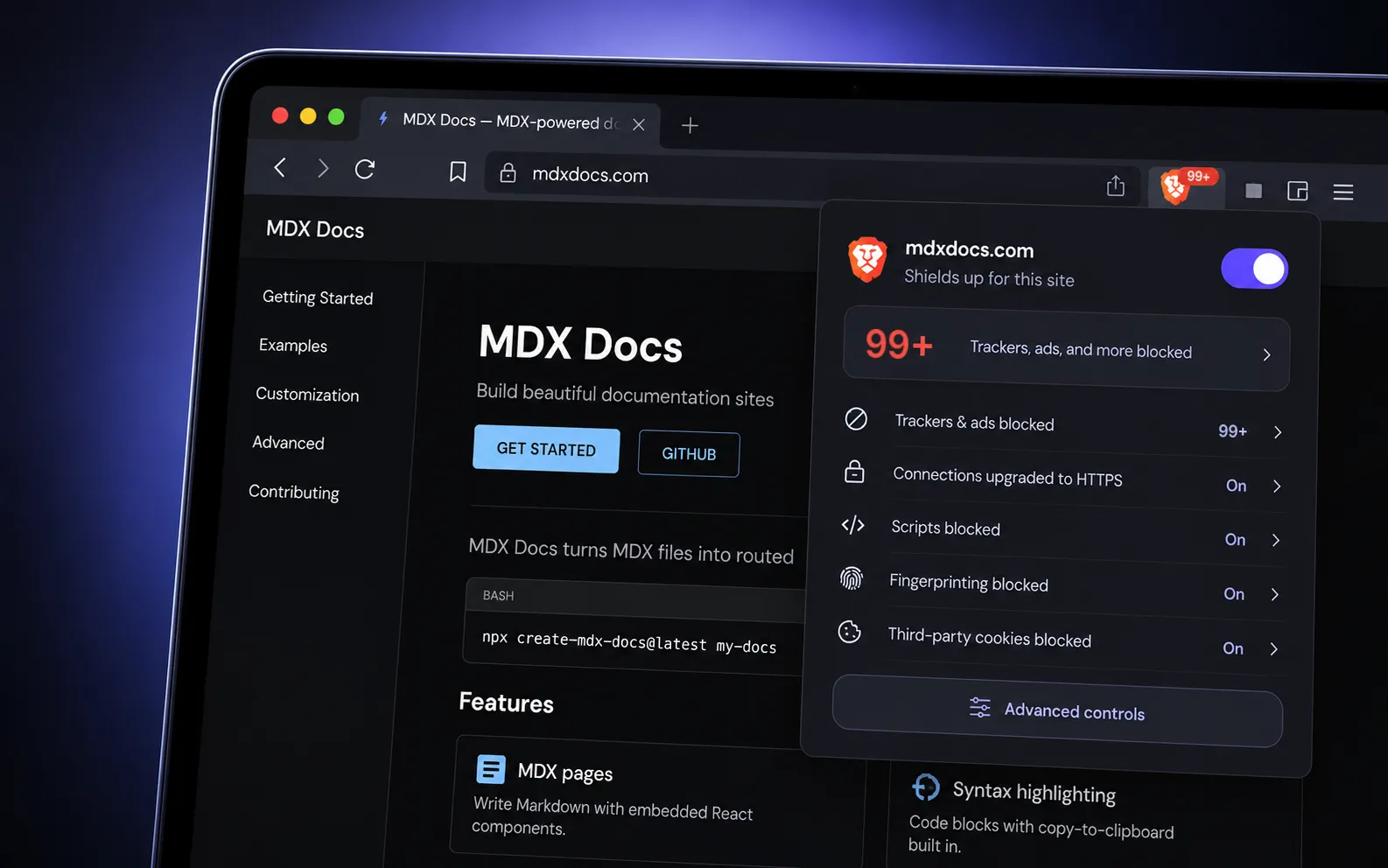
We were checking the analytics for one of our sites when we noticed that some of the visitors were coming from Brave. Brave is a browser that blocks trackers by default and keeps a count of what it has blocked beside the address bar. Out of curiosity, we opened one of our own sites in it: mdxdocs.com, the home of MDX Docs, our open-source generator for documentation sites.
The lion icon lit up, and the Shields counter read 99+, which is as high as it goes. We knew exactly what was running on that site because we had put it there: PostHog and Google Analytics. With two tools installed, we expected the counter to say two.
What the Brave Shields counter counts
Working that out took most of an afternoon. The first thing we learned is that the counter tallies blocked requests rather than trackers, and it keeps adding to the tally for as long as the page stays open. Two analytics tools and a hundred blocked requests don’t contradict each other, because they’re different units.
The second thing was that being blocked made the number bigger. PostHog’s client queues events and tries again when a send fails, and with Shields up, every send fails. Each retry was another blocked request, so the count kept climbing while we watched. Google Analytics contributed too, but PostHog was the one driving the number up.
The third was that configuration makes no difference. Brave blocks by destination, so a request to a known analytics platform gets stopped whatever features are switched on behind it. A PostHog install that only records page views is blocked just like one that records every session. You can’t config your way to a clean shield. The only lever you have is which tools are on the page at all.
Why it bothered us anyway
Nothing was broken. Both tools were doing what they’re built to do, and so was Brave. But we had installed those scripts ourselves and still needed an afternoon to understand the number. A visitor isn’t going to do that. They see the count, form an impression of the site, and move on.
It stung more because of what we build. HyperPaste never sends your clipboard history to our servers. Burn After encrypts files in your browser before they’re uploaded, so we couldn’t read them if we wanted to. Log Nutrients keeps your health data on your device. Those were deliberate decisions, and the websites for those apps are where a stranger decides whether to trust us enough to download one. We had thought hard about what the apps collect and had never asked whether the analytics on our websites matched the products they introduce.
Two tools doing two different jobs
We had added analytics the way a lot of developers do. You launch a site, paste in a tracking snippet, maybe a second one, and now you have page views, funnels, autocaptured events, and dashboards full of graphs. This time we started from the other end and wrote down what we wanted to know. How did people find the app? Which blog posts get read? Did our Product Hunt launch bring visitors? Are people coming back?
Those are questions about our business, and none of them needs a record of what an individual visitor clicked. Google Analytics answers all four. Around the same time, we had been building a small internal dashboard that pulls every one of our Google Analytics properties into one place, and we open it every morning to see traffic, referrers, and trends across the sites we run. That data has a reader.
PostHog does a different job. It’s product analytics, built to show how people behave inside a product: what they click, where they hesitate, where they give up. When we asked how often we looked at the autocaptured events or the click streams from mdxdocs.com, the honest answer was almost never. Data nobody reads isn’t neutral. It did nothing for us, and visitors still paid for it in trust every time a browser showed them what the page had tried to send.
What we removed and what we kept
We took PostHog off mdxdocs.com and left Google Analytics in place, which isn’t the privacy purist’s ending. Google Analytics is one of the most widely blocked scripts on the web. Brave still blocks it, and the shield on mdxdocs.com still lights up, with a much smaller number than before. If an empty shield were the goal, we’d need to go further, to a privacy-focused analytics service or plain server logs, and we may do that someday.
Dropping a tool we use every morning to make a badge look better would have been the wrong trade, though. The test we settled on was whether we could say what each script on the page is for and who reads what it collects. Google Analytics passed, and PostHog, the way we were using it, didn’t.
None of that is a knock on PostHog. A product with a long onboarding flow or a complicated interface can learn a great deal from seeing where people get stuck, and for that kind of product, behavioral analytics earns its place. A documentation site that wasn’t using what it collected is a different case.
How we choose analytics for a website now
That test is where analytics starts on any website we build. Before a snippet goes in, we ask what the owner wants to know and who is going to look at the answer, then pick the lightest setup that covers it. This site, for example, runs Google Analytics with its advertising features turned off. Sometimes the answer is more than that, when a product really does need to see how people use it. What we try not to ship is a script we couldn’t explain to a visitor who asked about it.
If you’ve never opened your own site in Brave, it takes about a minute. Click the lion and you’ll see the number some of your visitors have been seeing all along.
How we can help
Website design and development
Marketing, product, and content sites, designed and built down to the details, then launched and looked after.
Ongoing support and maintenance
Updates, fixes, platform changes, and steady improvements for websites, web apps, and native apps, long after launch.