
HyperPaste
Privacy-first clipboard manager for macOS.
Claude, Codex, and Grok usage limits in the macOS menu bar.
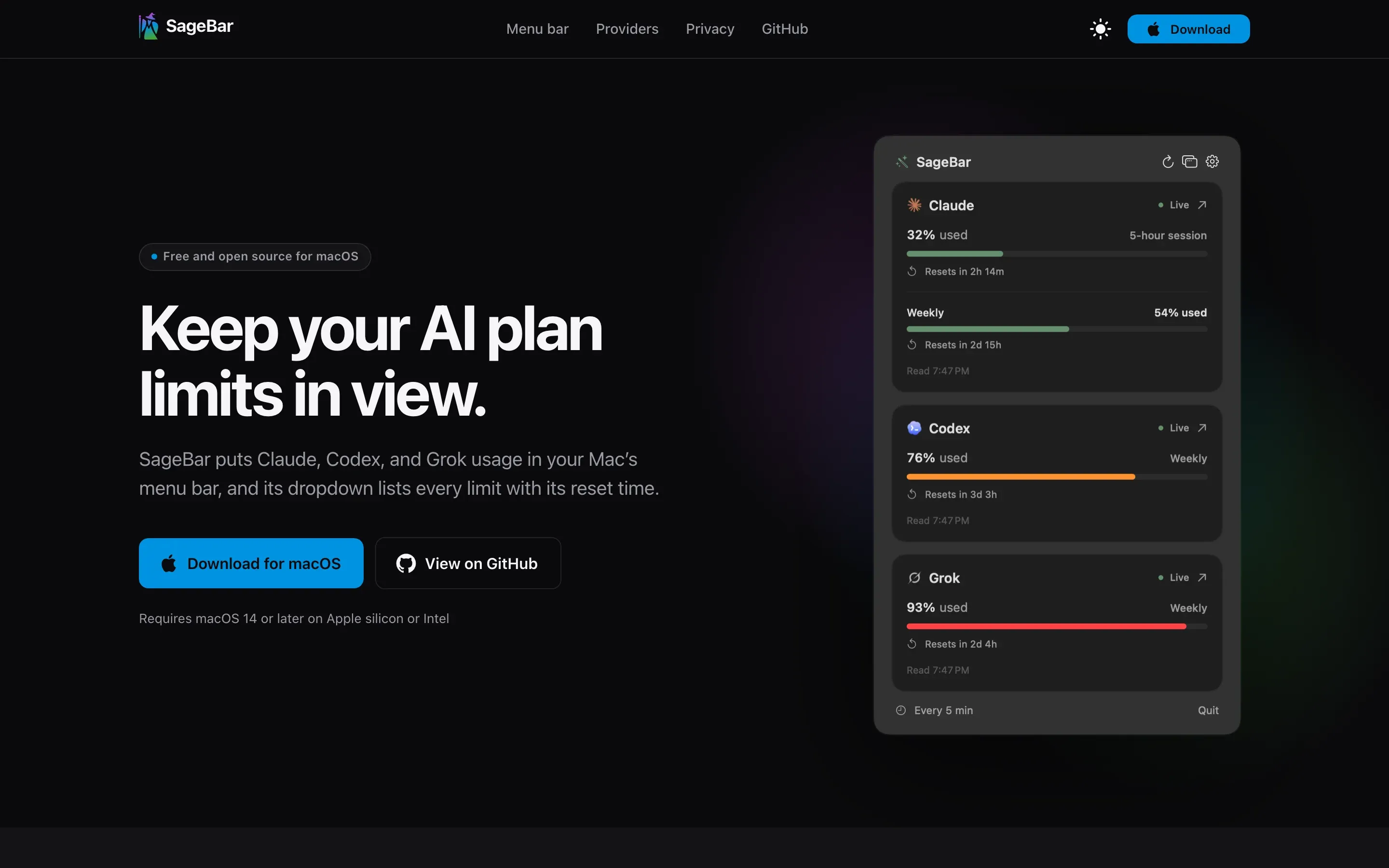
SageBar is a native macOS menu bar app that shows how much of your Claude, Codex, and Grok plan limits you’ve used.
The project started with a small, recurring annoyance. People who work with AI tools all day eventually hit a usage limit at the worst possible moment, and checking how close they are means opening a settings page in the browser, running a command, or digging through each provider’s app.
We wanted that number visible at a glance.
SageBar puts each provider’s logo in the menu bar beside how much of its current window you’ve used. Click it, and a dropdown shows every limit along with when it resets. There’s no account to create, no server in between, and nothing to set up beyond connecting the providers you use.
SageBar is free, open source, and released under the MIT license.
Every design decision in SageBar is weighed against a few core principles:
The goal isn’t to build another dashboard to manage. It’s to answer one question, how much do I have left, before you need to ask it.
SageBar is built around a quick glance at the menu bar, with more detail one click away:
The hardest part of SageBar is that no two providers report usage the same way.
Codex has a documented interface: its command-line tool includes an app server that can report rate limits. SageBar starts it, asks for the limits, and stops it again, without starting a chat or spending a single token. Claude and Grok have no public usage API, so SageBar reads the same endpoints their own websites use, with a session the user pastes in. Those endpoints are undocumented and can change without notice, so SageBar handles more than one response format and fails visibly rather than silently.
The limits themselves don’t line up either. Claude has a five-hour session alongside its weekly limit, Codex’s primary window isn’t always five hours, and Grok draws every product from one shared weekly pool. SageBar names each window’s real duration instead of assuming one.
Being honest about what it knows mattered as much as accuracy. A dash means a reading is unavailable or stale. After a refresh error, the last good readings stay visible and marked. A countdown that reaches zero doesn’t assume the quota is fresh; SageBar waits for the next reading to confirm it.
Then there’s the menu bar itself, which has very little room. Fitting three providers led to a compact bar style that moves reset countdowns beneath each bar, and to provider marks tuned to stay crisp at menu bar size in light and dark mode.
Security shaped the rest. Pasted sessions live only in the Keychain and go only to their own site over HTTPS, and SageBar refuses redirects to any other host. It never reads Codex’s credentials at all.
Building SageBar deepened our experience with:
The biggest lesson was that a status display is only useful if people can trust it. A stale number shown as if it were current is worse than no number at all, so much of SageBar’s design is about being clear about what it knows and when it learned it.
How we can help
Swift and SwiftUI apps that behave like they belong on the device, shipped through the App Store.
Discovery, flows, prototypes, and interface design: working out how a product should work before anyone builds it.
Privacy-first clipboard manager for macOS.
An iOS app for building and tracking daily habit routines.
A calm workout routine tracker focused on consistency over perfection.
Contact
Tell us what you’re building, or what needs fixing. We’ll get back to you as soon as possible.